
Use this guide to compare website proposals, map the two inquiry paths, and assign responsibility for copy, forms, local business details, and launch testing. Start with how your crew actually handles requests, then choose the pages and features that support that process.
Buy a working inquiry system, not just a homepage
Start with the jobs you actually want and can deliver. Separate urgent troubleshooting from panel upgrades, EV charger installation, rewiring, and commercial maintenance. Those projects need different qualification questions and proof of capability. Two inquiry paths do not require two websites. A shared navigation can offer “Electrical repairs” and “Projects & estimates” without hiding either option from mobile visitors.
Before choosing a design, document who answers calls, which hours allow dispatch, and who reviews project requests. Put residential and commercial work on separate service pages when scope, equipment, or decision-makers differ. A commercial maintenance buyer may need a contract discussion, while an EV charger customer needs an installation assessment. Neither should face an emergency-only homepage.
When comparing proposals, ask for a page map and inquiry-flow sketch, not just homepage mockups. Assess the business website package against your required pages, copy responsibilities, form behavior, and launch checks. The contractor supplies service boundaries and evidence; the editor organizes those facts; the developer builds and tests the agreed routes. Put those responsibilities in the proposal.
Give urgent calls and planned work different next steps
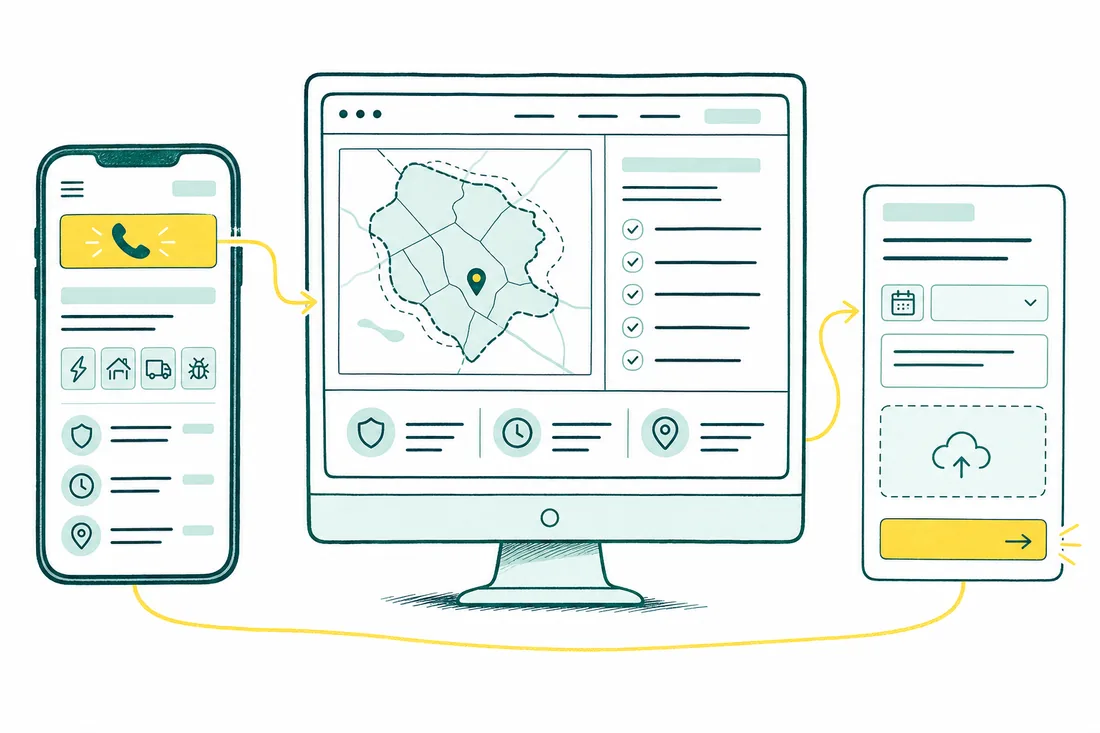
On repair pages, show the phone number, answer hours, and covered area near the top. Use a working tel: link, not a number embedded in an image. Keep calling visible without hiding project requests. A sticky mobile bar can offer “Call for repairs” and “Request a project estimate”; it must not cover safety text or form controls.
Before lead capture, explain that smoke, sparks, or a burning smell require moving to safety and contacting emergency services if danger is immediate. For a neighborhood-wide outage, point people to the utility. Do not require photos to reveal this guidance or publish instructions to open equipment or repeatedly reset a breaker.
Project pages should lead to a short estimate form with service type, property location, timing, and contact preference. Explain whether the next step is a callback or site visit, using only response commitments your team can meet. Test both buttons on a real phone: does calling open the right number, and does the estimate button reach the planned-work form rather than a generic contact screen?
Show real credentials and make photo estimates useful
Replace decorative trust badges with verifiable facts: the applicable license number, issuing authority, work jurisdiction, and current insurance information. Identify residential versus commercial capability and responsibility for permits, inspections, and utility coordination. The contractor confirms these details; the editor publishes their actual scope. The service-page copywriting guide explains how to turn that evidence into useful buying information.
For planned work, allow an optional photo of the closed breaker panel’s exterior, taken from a safe position without touching equipment or removing covers. Keep the form usable without photos. Ask what the customer wants installed or changed, not for a diagnosis. Explain that a photo supports initial review; it does not verify capacity or replace an on-site assessment.
The developer should restrict file types and sizes, keep uploads out of public indexing, and provide clear failure messages. Assign a named recipient and retention policy. Test a valid upload, an oversized file, and a submission without an attachment. Confirm that the reviewer can access the image privately and that the customer receives an acknowledgment without an unsupported dispatch promise.
Separate service coverage from a customer-facing shop
A service-area page should explain where you travel, which jobs you accept there, and any genuine scheduling limits. It should not imply a local branch that does not exist. Publish separate town pages only when they offer useful differences, such as coverage constraints or documented work. Use the service-area page guide before approving a batch of town-name substitutions.
Follow Google’s Business Profile guidelines when choosing between a storefront, service-area business, or eligible hybrid operation. If customers are not served at your address, hide it on the profile. A home office is not automatically a public shop. Do not create extra profiles using mailboxes or unstaffed addresses simply to appear closer to customers.
Compare the profile’s website field with the homepage’s final URL after redirects and its declared canonical, allowing for campaign parameters. Then compare the business name, actual call destination, hours, and service coverage. Fix contradictions before launch: a profile advertising evening service should not send visitors to a site showing daytime-only availability. The contractor approves coverage; the editor checks claims; the developer verifies URL resolution.
Put launch checks and lead ownership in the proposal
A comparable proposal names the pages, mobile layouts, copy owner, upload handling, hosting, maintenance, and handoff access. If replacing a site, include an old-to-new URL map and redirects for retired pages with relevant replacements. Separate one-time build work from ongoing updates. Avoid a scope that sells emergency messaging without confirming who will answer those calls.
The developer should verify that each indexable service page returns HTTP 200, has no accidental noindex, and declares the intended canonical URL. Check crawlable service links and descriptive titles against Google’s SEO Starter Guide. Test phone links, keyboard access, form errors, confirmations, and upload delivery on mobile. The editor signs off on service descriptions and credentials; the contractor signs off on availability and safety wording.
Measure repair call taps and project submissions separately, then record whether each became a suitable inquiry. A phone tap is not a completed call, and a form submission is not booked revenue. Assign follow-up ownership before launch. To discuss your website requirements, bring your current pages, service list, and the questions your team asks before scheduling work.
Pre-implementation verification checklist
- On a real phone, verify that repair calls and project estimates have distinct buttons and that tap-to-call reaches the correct line.
- Confirm response hours, dispatch limits, published credentials, and safety wording with the contractor before approving the copy.
- Submit the estimate form with and without a photo; check delivery, error messages, private storage, and the person assigned to respond.
- Compare Business Profile details with the website, verify the final homepage URL, and assign launch checks to the developer and content owner.
Frequently asked questions
Should I advertise 24/7 electrical service on my website?
Only if someone can answer and arrange service throughout those hours in your stated area. An answering service or next-day callback is not the same as round-the-clock dispatch. Publish actual coverage hours and explain what happens after hours, including whether callers reach your crew, an answering service, or voicemail.
Can customers get an accurate quote from a breaker panel photo?
A photo can help qualify the request, but it cannot establish installation condition, available capacity, cable routing, or every permit requirement. Treat it as preparation for a conversation or site visit. Request only a safely accessible exterior view, and tell customers what additional assessment is needed before a firm quote.
Do I need a public shop address to appear in local search?
Not necessarily. An electrician who travels to customers may qualify as a service-area business. If customers are not served at your address, hide it on the Business Profile and describe your real coverage area. Do not invent storefronts or create extra profiles using mailboxes to target nearby towns.
What should an electrician website proposal include?
Ask for the page list, repair and project inquiry flows, copy responsibilities, credential checks, form and photo handling, mobile testing, and launch requirements. Clarify domain ownership, hosting, maintenance, and access after handoff. Compare those deliverables rather than visual mockups alone, and make sure someone owns lead follow-up after launch.